Dominio de Prompts para Generadores de Imágenes con IA: El Framework de 2026 para Visuales Profesionales
Resumen rápido
- Obtener grandes resultados de un generador de imágenes con IA no es cuestión de suerte ni de escribir «make it beautiful». En 2026, los visuales profesionales nacen del prompting estructurado: tratar a la IA como una cámara y un director de arte al mismo tiempo. Descubre el Six-Element Framework y cómo elegir entre GPT Image 2, Nano Banana 2, Flux 1.1 Pro y Midjourney.
- Obtener grandes resultados de un generador de imágenes con IA no es cuestión de suerte ni de escribir «make it beautiful».
- El Framework de Prompt de Seis Elementos
Proceso editorial
Revisado por SectoJoy y publicado el 21 de junio de 2026. Actualizamos este artículo cuando cambian los detalles del producto, los ejemplos o la guía de la herramienta. Última actualización: 21 de junio de 2026.
SectoJoy
Soy un desarrollador independiente que crea aplicaciones iOS y web, enfocado en productos SaaS prácticos. Me especializo en SEO con IA, explorando constantemente cómo las tecnologías inteligentes pueden impulsar el crecimiento sostenible y la eficiencia.
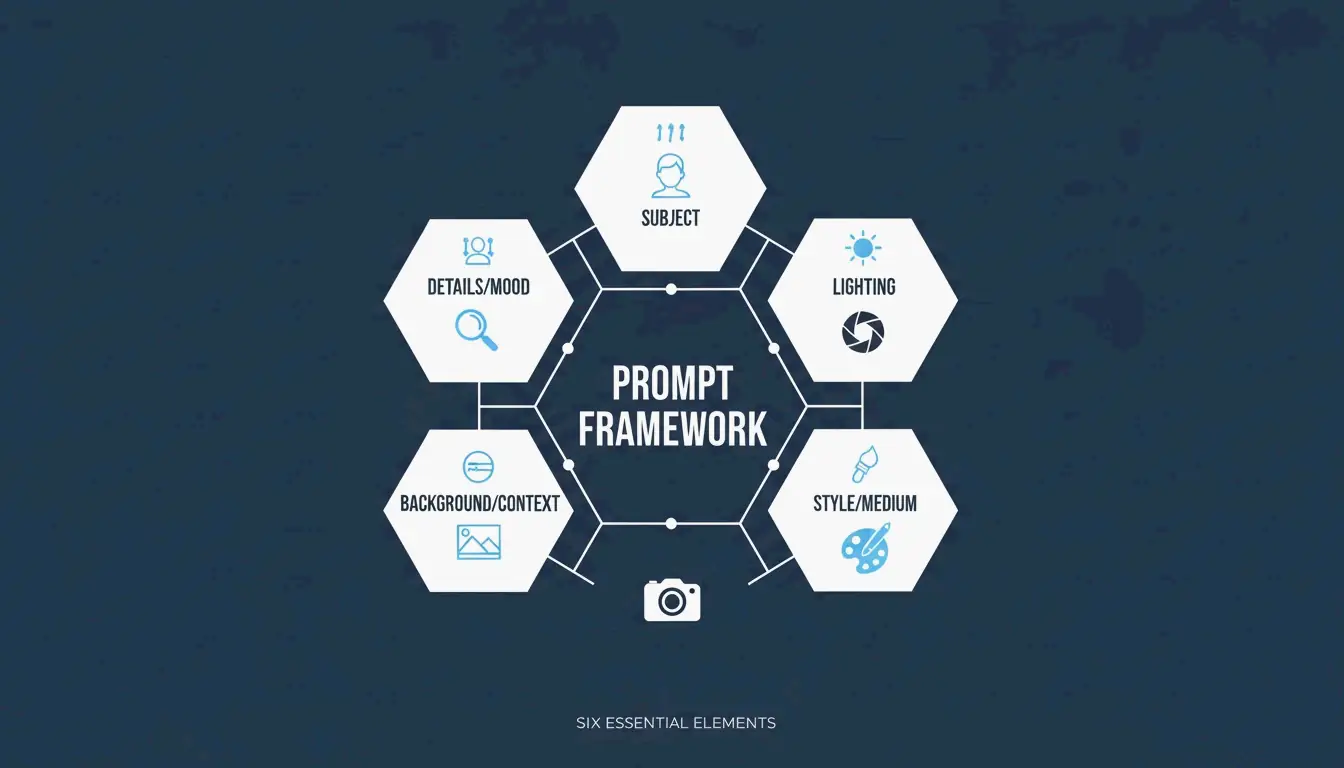
Obtener grandes resultados de un generador de imágenes con IA no es cuestión de suerte ni de escribir «make it beautiful». En 2026, los visuales profesionales nacen del prompting estructurado: tratar a la IA como una cámara y un director de arte al mismo tiempo. El enfoque que se ha consolidado como estándar de la industria es el Six-Element Framework: Subject, Environment, Style, Lighting, Composition y Quality Modifiers.
Esta guía cubre el framework completo, compara los mejores modelos (GPT Image 2, Nano Banana 2, Flux 1.1 Pro, Midjourney) y te muestra cómo iterar desde un borrador hasta una imagen lista para producción.
El Framework de Prompt de Seis Elementos
El cambio clave: deja de describir y empieza a instruir. Los datos de Adobe muestran que, hacia 2025, el 67% de los equipos de marketing había integrado la generación con IA en sus flujos diarios, convirtiendo la ingeniería de prompts en una habilidad profesional esencial.
Este es el framework que garantiza que cada elemento de tu imagen sea una decisión deliberada:
| Elemento | Qué especificar | Ejemplo |
|---|---|---|
| Subject | Enfoque principal con detalles físicos | «un portátil plateado delgado, abierto en un ángulo de 90 grados sobre un escritorio de roble blanco» |
| Environment | Fondo o escenario | «estudio minimalista con paredes grises suaves» |
| Style | Medio o género visual | «fotografía editorial», «ilustración plana», «render 3D» |
| Lighting | Dirección, calidad, temperatura | «luz natural suave de ventana desde la izquierda, tono cálido» |
| Composition | Ángulo de cámara y encuadre | «gran angular, perspectiva a la altura de los ojos, profundidad de campo reducida» |
| Quality | Objetivos técnicos de salida | «4K, ultra-realista, alta fidelidad» |
Por qué la precisión vence a los adjetivos
Palabras como «stunning» o «beautiful» no le dicen nada útil a un modelo de IA. Especificar un «50mm lens» o «DSLR-style photography» obliga a la IA a simular ópticas reales, incluido el desenfoque natural del fondo (bokeh). Según la guía de ImagineArt, controlar la iluminación es la forma más eficaz de pasar del «look falso de IA» a una fotografía profesional.
Caso de estudio: reducción de costos del 75% en e-commerce
Este framework no se trata solo de estética: está transformando la economía de la producción de contenidos. Tal como informa Pixazo, una plataforma de e-commerce utilizó prompting estructurado con Seedream 4.5 y 5.0 para generar más de 10.000 imágenes de producto al mes. Al sustituir las sesiones fotográficas tradicionales (típicamente entre $2.000 y $10.000 cada una), la empresa redujo sus costos creativos en un 75% y aceleró el tiempo de salida al mercado.
GPT Image 2: Tipografía e instrucciones complejas
GPT Image 2 es un avance decisivo de 2026 porque maneja instrucciones por capas y renderiza texto legible dentro de las imágenes, algo con lo que los modelos anteriores tenían dificultades. Para conseguir una tipografía limpia:
- Coloca el texto deseado entre comillas:
"SALE 50% OFF" - Especifica el estilo de fuente: «bold sans-serif» o «thin serif»
- Define la ubicación: «centrado en una banda blanca, tercio superior de la imagen»
El límite de fiabilidad en 2K
La precisión técnica también se extiende a la resolución. Aunque GPT Image 2 puede apuntar a 4K (3840×2160), la documentación de OpenAI sugiere tratar cualquier valor por encima de 2560×1440 (2K) como un «límite experimental». Para mantener texturas y lógica consistentes en producción, quédate dentro de 2K. Asegúrate siempre de que las dimensiones sean un multiple of 16.
Prompts para consistencia de marca
GPT Image 2 está diseñado para los «Context-Rich Prompts». En lugar de simplemente describir la imagen, dile a la IA para qué es. IndianPrompt recomienda formulaciones como: «Genera una imagen profesional para un artículo de blog sobre productividad… el tono debe ser optimista». Esto ayuda al modelo a elegir automáticamente paletas de color y disposiciones que se ajustan a los estándares del diseño profesional.
Nano Banana 2 y Flux 1.1 Pro: líderes en fotorrealismo
Si tu objetivo es un realismo fotográfico absoluto, así se comparan los mejores modelos:
| Modelo | Fortaleza | Ideal para |
|---|---|---|
| Nano Banana 2 (Gemini 3 Pro Image) | Microtexturas: poros de la piel, tramas de tela, materiales envejecidos a 4K | Arquitectura, fotografía de producto, hiperrealismo |
| Flux 1.1 Pro | Simulación de luz natural: cómo rebota la luz, dónde caen las sombras | Pipelines de desarrollo, iluminación consistente, trabajo de alto volumen |
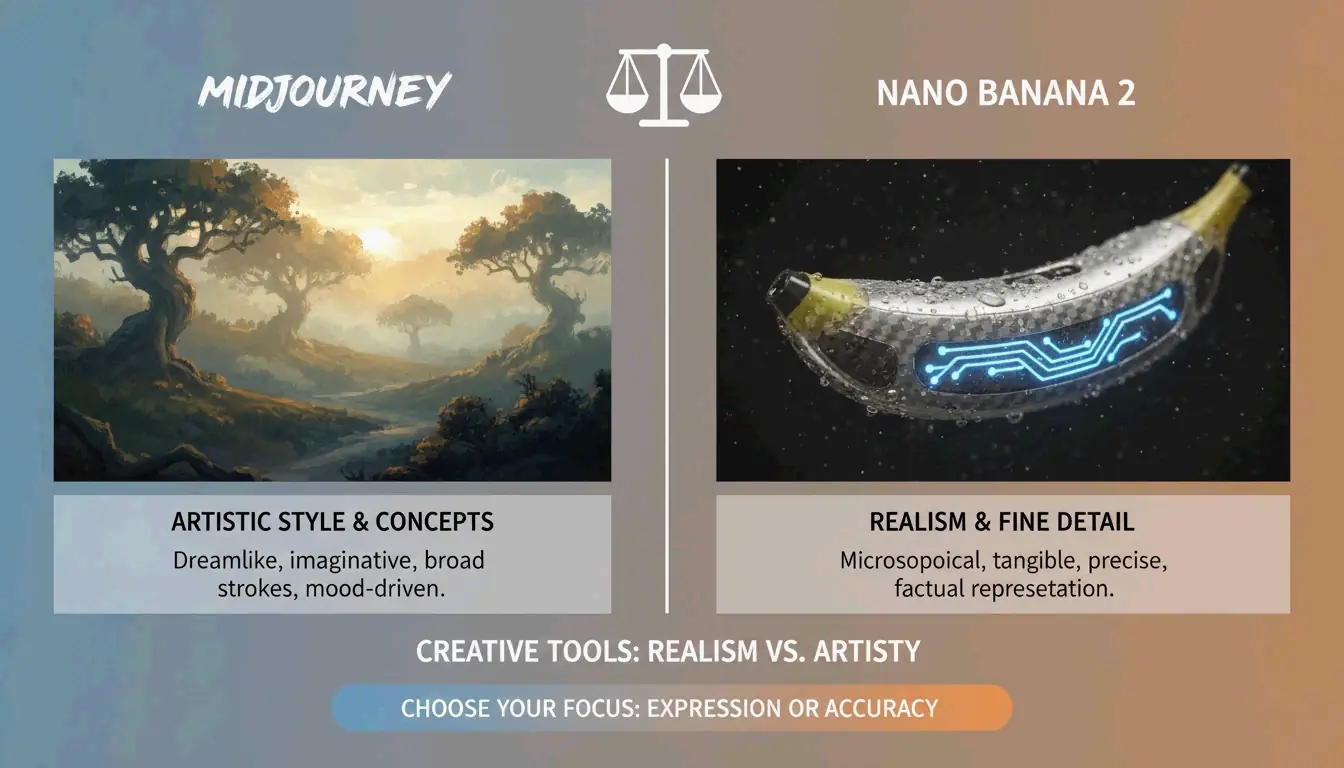
| Midjourney | Atmósfera artística, imágenes atmosféricas, estilo editorial | Conceptos abstractos, storytelling de marca, «sensación antes que precisión» |
AIMLAPI señala que Nano Banana 2 es actualmente el modelo más detallado para arquitectura y tomas de producto. Midjourney aún conserva un 26,8% de cuota de mercado en 2026 (Prodia), lo que lo convierte en la opción preferida cuando se necesita una «atmósfera artística» en lugar de un documento literal.
Técnicas avanzadas: refinamiento iterativo
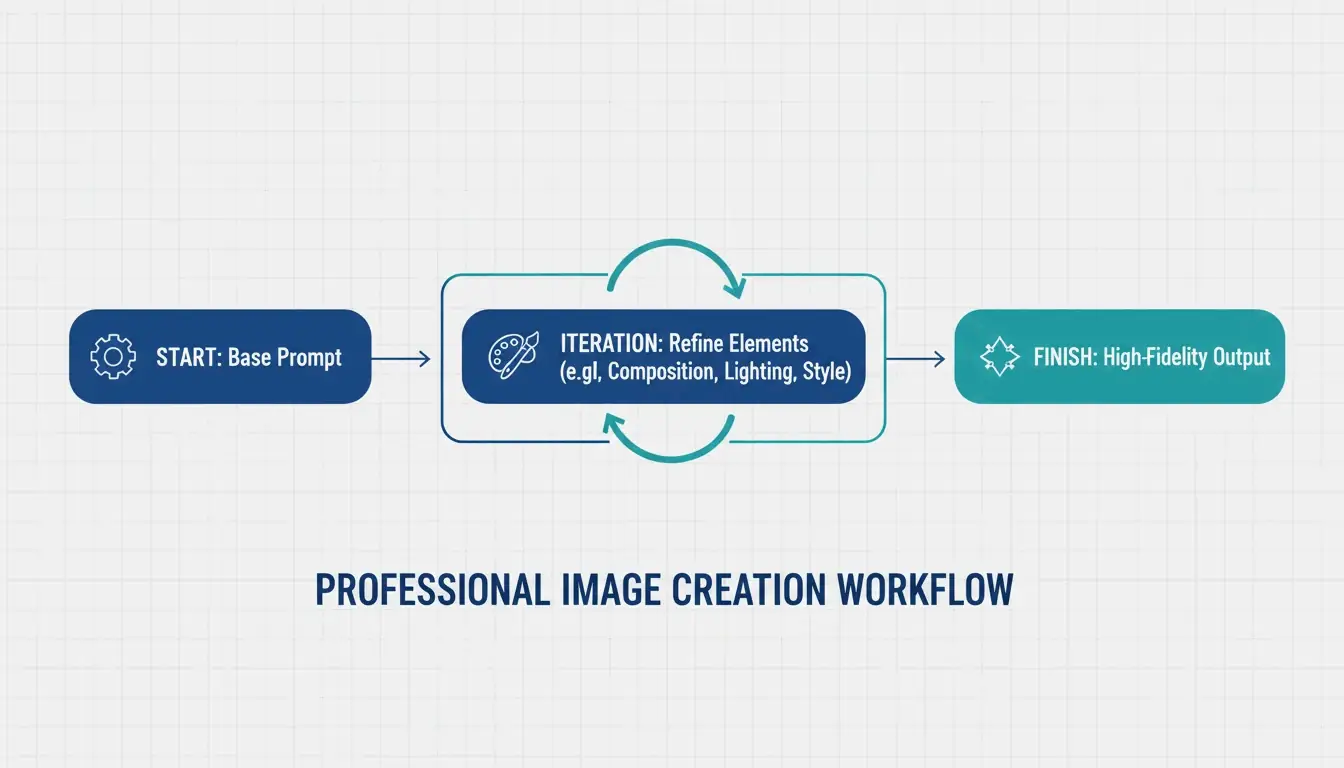
Las imágenes de IA profesional rara vez son perfectas al primer intento. El estándar de la industria es un bucle de refinamiento de 3–5 pasos:
- Prompt base: consigue bien la composición y el sujeto
- Pasadas de refinamiento: usa instrucciones dirigidas como «cambia solo el color de la chaqueta, mantén el rostro idéntico»
- Acabado final: ajusta la iluminación, corrige artefactos y asegúrala con la marca
ImagineArt subraya la importancia de reiterar los invariantes: decirle explícitamente a la IA qué no debe cambiar entre iteraciones. Sin esto, el modelo tiende a derivar.
Negative prompts para control de calidad
El negative prompting sigue siendo esencial: dile a la IA qué debe excluir:
– "extra fingers, extra limbs" — Artefactos clásicos de la IA
– "text overlays, watermarks" — Adiciones no deseadas
– "stock photo aesthetic, over-smoothed skin" — El look genérico «de plástico» común en salidas de alta saturación
Preparación para Image-to-Video
Una gran tendencia de 2026: generar imágenes estáticas optimizadas para herramientas de vídeo como Kling o Grok. Al crear visuales para el pipeline Image-to-Video (I2V), asegúrate de producir keyframes de alta resolución con características consistentes, de modo que la IA pueda animar la escena sin fallos.
Flujos especializados: salida SVG y consistencia de marca
Para diseñadores que necesitan archivos escalables, Recraft V4 es la opción destacada: el único modelo importante que genera archivos SVG (vectoriales escalables) verdaderos. Según AIMLAPI, su soporte nativo de kit de marca te permite subir tus propias paletas de color y logos, garantizando que cada generación se ajuste al lenguaje de diseño de tu empresa.
Consistencia de personajes entre escenas
Herramientas como Midjourney y Nano Banana 2 ahora soportan etiquetas «Character Reference» (Cref), que permiten que el mismo personaje aparezca de forma consistente en distintas escenas. Combinadas con un prompt «Character Seed» que define rasgos fijos (edad, color de pelo, vestimenta), suponen una gran ventaja para el storytelling de marca.
Seguridad legal para uso comercial
Adobe Firefly, con más de 6.500 millones de visuales creados, sigue siendo la opción preferida para uso empresarial porque está entrenado con contenido con licencia y ofrece protección comercial que los modelos open-source no pueden igualar. Verifica siempre los requisitos vigentes de divulgación de IA para tu mercado.
Conclusión
La imagen profesional con IA en 2026 ha pasado de la adivinación creativa a la ingeniería estructurada. El enfoque práctico:
- Usa el Six-Element Framework en cada prompt: Subject, Environment, Style, Lighting, Composition, Quality
- Elige el modelo adecuado: GPT Image 2 para tipografía y disposiciones, Nano Banana 2 para fotorrealismo, Midjourney para atmósfera artística
- Itera de 3 a 5 veces: empieza por la composición, refina los detalles y luego da el acabado
- Piensa más allá de lo estático: optimiza para el pipeline Image-to-Video cuando sea necesario
Dominar estas instrucciones técnicas convierte a la IA de un juguete novedoso en un estudio digital de alto rendimiento.
Preguntas frecuentes
¿Qué generador de imágenes con IA es mejor para renderizar texto claro en 2026?
GPT Image 2 es el líder actual en tipografía (AIMLAPI). Sigue instrucciones complejas de diseño mejor que Nano Banana 2 o Midjourney. Para mejores resultados, coloca el texto entre comillas y especifica el estilo de fuente y la ubicación.
¿Puedo usar imágenes generadas por IA para marketing comercial?
Sí, pero depende de la licencia de la herramienta. Los niveles empresariales de GPT Image 2 y Adobe Firefly generalmente permiten uso comercial. Prodia señala que Adobe Firefly es especialmente seguro porque está entrenado con contenido con licencia. Revisa siempre los requisitos actuales de divulgación de IA para tu región.
¿Cómo mantengo la consistencia de un personaje en varias escenas?
Usa etiquetas Character Reference (Cref) en Midjourney o Nano Banana 2. Crea un prompt «Character Seed» que defina los rasgos físicos fijos. ImagineArt sugiere usar el refinamiento iterativo para ajustar los fondos mientras mantienes al sujeto estático.
¿Cuáles son las resoluciones recomendadas para GPT Image 2?
Para uso en producción, quédate en 2560×1440 (2K). Aunque 3840×2160 (4K) es posible, el Cookbook de OpenAI trata el límite de 3840px como experimental. Asegúrate siempre de que las dimensiones sean multiples of 16.
Preguntas frecuentes
¿Qué generador de imágenes con IA es mejor para renderizar texto claro en 2026?
GPT Image 2 es el líder actual en tipografía (AIMLAPI). Sigue instrucciones complejas de diseño mejor que Nano Banana 2 o Midjourney. Para mejores resultados, coloca el texto entre comillas y especifica el estilo de fuente y la ubicación.
¿Puedo usar imágenes generadas por IA para marketing comercial?
Sí, pero depende de la licencia de la herramienta. Los niveles empresariales de GPT Image 2 y Adobe Firefly generalmente permiten uso comercial. Prodia señala que Adobe Firefly es especialmente seguro porque está entrenado con contenido con licencia. Revisa siempre los requisitos actuales de divulgación de IA para tu región.
¿Cómo mantengo la consistencia de un personaje en varias escenas?
Usa etiquetas Character Reference (Cref) en Midjourney o Nano Banana 2. Crea un prompt «Character Seed» que defina los rasgos físicos fijos. ImagineArt sugiere usar el refinamiento iterativo para ajustar los fondos mientras mantienes al sujeto estático.
¿Cuáles son las resoluciones recomendadas para GPT Image 2?
Para uso en producción, quédate en 2560×1440 (2K). Aunque 3840×2160 (4K) es posible, el Cookbook de OpenAI trata el límite de 3840px como experimental. Asegúrate siempre de que las dimensiones sean multiples of 16.
Artículos Relacionados
Generador de Fuentes: El Mapa Completo del Texto con Estilo en 2026
Generador de fuentes estéticas: la guía definitiva para texto Unicode con estilo
Generador de fuentes de caligrafía: herramienta online gratuita para estilos de texto elegantes