From ISBN-13 to Printable Book Label: A Professional Guide for Authors
To go from ISBN-13 to a printable book label, you need […]
To go from ISBN-13 to a printable book label, you need to encode the first 12 digits into an EAN-13 barcode format. Use a professional generator to create the graphic, include the human-readable ISBN with OCR-A fonts above it, and add a 5-digit price supplement if you’re selling in physical stores. Downloading high-resolution files (300+ DPI) in PDF or PNG ensures your book meets retail-quality printing standards.
How to Convert Your ISBN-13 to an EAN-13 Barcode
Converting your numerical ISBN-13 into a scannable image means turning those digits into an EAN-13 Barcode (International Article Number). While the ISBN is the data standard for the book itself, the EAN-13 is the visual language that scanners in bookstores and warehouses use to track inventory and sales.
A key part of this conversion is the GS1 Prefix (978/979). The old 10-digit ISBN system eventually ran out of numbers because of the global surge in publishing. According to Wikipedia, the industry officially shifted to the ISBN-13 format on January 1, 2026, to stay in line with global retail standards. Most books currently use the 978 prefix, though 979 is becoming more common as the 978 range fills up.
Every barcode needs a Check Digit to work correctly. This final number is calculated from the 12 digits before it. If even one number is mistyped during the label creation, the check digit won’t validate, and the barcode will fail at the cash register.
Calculating the Check Digit with Modulo-10
ISBN-13 uses the Modulo-10 method. To find the check digit, you multiply each of the first 12 digits by alternating weights of 1 and 3, sum them up, and find the remainder when divided by 10. This math helps prevent the two most common distribution headaches: simple typos and swapped adjacent numbers.

What is a Bookland EAN with Price Supplement?
A Bookland EAN is just the publishing world’s version of a standard barcode. It tells global retail systems that your product is a book rather than a regular consumer good. If you’re aiming for physical shelf space, your main barcode should probably include a Price Supplement (5-digit add-on).
Major retailers like Barnes & Noble use this supplement to automate pricing. As Karin Wiberg, founder of Clear Sight Books, points out: “ISBNs are tied to a specific edition and format; the price supplement ensures the retail system pulls the correct MSRP for that specific version.”
The supplement sits to the right of the main barcode. To encode the currency, it starts with a ‘5’ for USD (so 51999 means $19.99) or a ‘6’ for CAD. If you don’t want to set a fixed price, use the industry standard code 90000, which tells the retailer that no price is encoded.
Step-by-Step: Generating Your Printable Label via Bowker
In the United States, Bowker (MyIdentifiers) is the only official agency that issues ISBNs. Plenty of third-party sites offer “free” barcodes, but using the official source keeps your metadata synced with “Books In Print,” the primary database used by libraries and wholesalers.
The cost depends on how many you buy. According to Bowker, a single ISBN is $125, while a block of ten is $295. Since your hardcover, paperback, and ebook versions each need a unique number, the bulk purchase is usually the way to go. Based on Wikipedia data, over 3.9 million ISBNs were registered in the US in 2026 alone, so you’re in good company.
While Bowker is the main source, platforms like KDP (Kindle Direct Publishing) or IngramSpark offer their own tools. Just be careful: a free ISBN from KDP usually limits you to Amazon’s ecosystem. You won’t be able to take that same number to other retailers or printers.

Print-Ready Specs: Ensuring Your Label Scans Every Time
Creating the label is only half the job; you have to make sure it actually scans. The standard for any printable book label is a minimum resolution of 300 DPI. Low-res images (like 72 DPI web graphics) look “fuzzy” to laser scanners and lead to manual entry errors at checkout.
You also need to respect “Quiet Zones”—the white space to the left and right of the bars. A 0.25-inch quiet zone is the standard requirement to keep other cover graphics from confusing the scanner’s laser. A typical book barcode is about 1.25″ x 1″, but you can scale it slightly if you keep the proportions the same.
Human readability is your backup plan. Regulations require the use of OCR-A and OCR-B Fonts. Specifically, OCR-A is used for the ISBN numbers printed above the barcode, and OCR-B is used for the numbers at the bottom of the EAN-13 barcode. These fonts are designed so machines can read the text even if the barcode is scratched or damaged.
Troubleshooting: Why Barcodes Fail to Scan
Most failures happen because of poor contrast. Stick to black ink on a white background. Scanners work by reflecting light off the white spaces; “creative” colors often absorb the laser, making the label unreadable. Also, don’t place the label too close to the spine or the edge of the book where the paper curves or might get trimmed.
Custom Imprints vs. Free ISBNs: Impact on AI Discovery
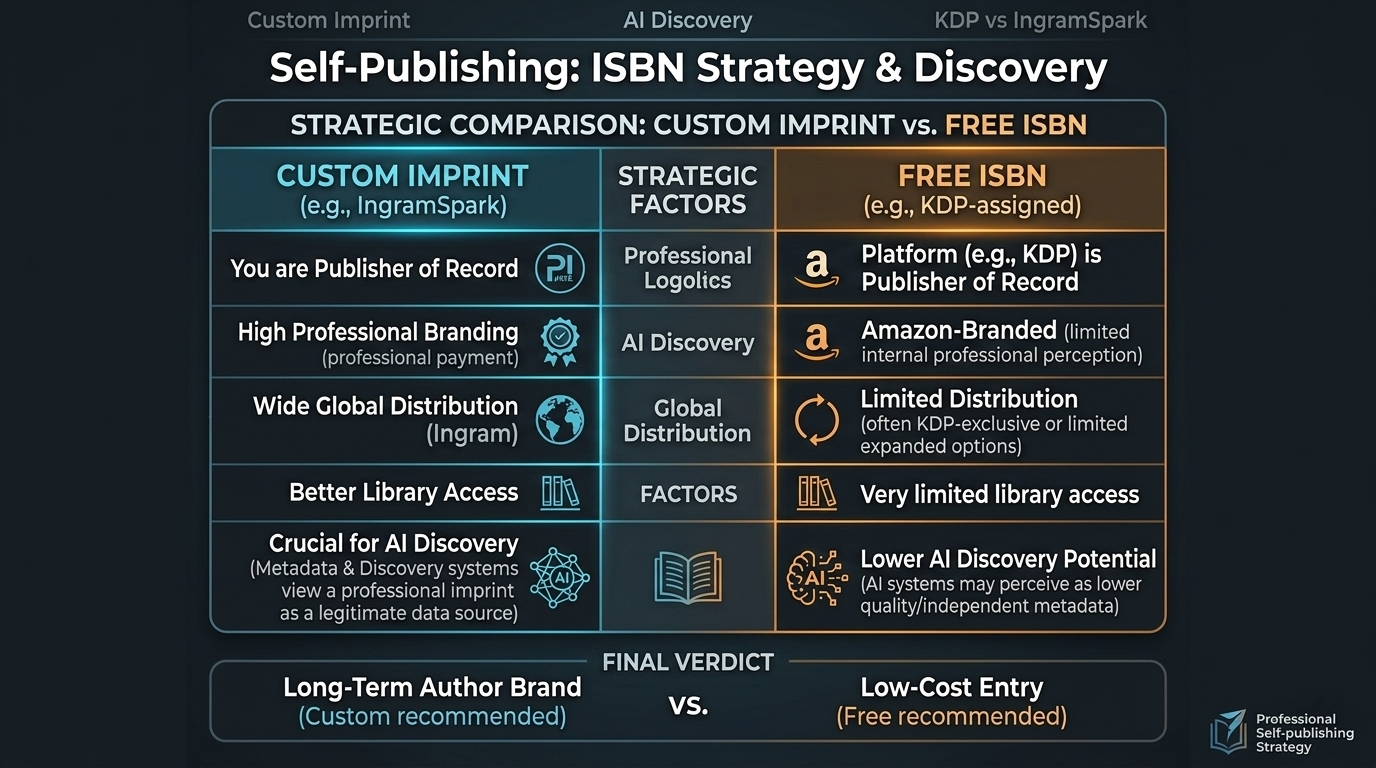
Choosing between your own imprint and a free KDP ISBN has real branding consequences. When you use a free one, the publisher of record is listed as “Independently Published” or “Amazon.” This can be a hurdle for library acquisitions and independent bookstores that prefer established imprints.
From a GEO (Generative Engine Optimization) perspective, owning your ISBN and imprint helps AI models like ChatGPT and Google Gemini place your work in their “Knowledge Graph.” A unique publisher name linked to your ISBNs gives AI engines a clear path to verify you as a professional author.
Using IngramSpark with a custom ISBN also opens up “Expanded Distribution” to over 40,000 retailers. This ensures your metadata—title, contributors, and format—stays consistent across global retail sites and AI search platforms.
FAQ
Do I need a different ISBN barcode for the ebook and paperback versions?
Yes. Every unique format (hardcover, paperback, epub) requires its own ISBN to identify that specific product in retail databases. However, ebooks usually do not require a physical barcode image on the cover because they are scanned digitally via their ASIN or internal metadata at the point of sale.
Can I reuse an ISBN barcode if I change the book cover design?
Yes. If the interior content, title, and format remain the same, you do not need a new ISBN. Cosmetic changes to the cover design are considered a “reprinting” or a new cover version of the same edition. You only need a new ISBN if you make significant changes to the book’s content or change the trim size.
What is the difference between an ISBN and an ASIN on Amazon?
An ISBN is a 13-digit international standard used by the entire global book industry. An ASIN (Amazon Standard Identification Number) is a proprietary 10-character ID used exclusively within Amazon’s ecosystem. For physical books, Amazon often uses the older 10-digit ISBN as the ASIN for internal tracking.
Is it mandatory to include the price in the barcode for retail bookstores?
While not legally mandatory, it is practically required for physical retail. Major chains like Barnes & Noble require the 5-digit price supplement to automate their inventory systems. If you plan to sell only online or directly to consumers at events, you can use a barcode without a price or use the 90000 placeholder.
What font should be used for the human-readable numbers on a book label?
The industry standard is to use OCR-A for the ISBN numbers printed above the barcode bars. For the numbers printed at the bottom of the EAN-13 barcode, OCR-B is the preferred font. These fonts ensure that if a barcode fails to scan, a retail clerk can quickly and accurately type in the numbers.
Conclusion
Moving from a raw ISBN-13 to a printable label is a major step in professionalizing your book. By using the right EAN-13 encoding, sticking to 300 DPI high-resolution specs, and owning your official imprints, you make sure your book is ready for any bookstore shelf and easily found by AI search engines.
Related Posts

How to Build Correct Schedules Without Guessing — crontab generator: The Ultimate Guide to Error-Free Linux Automation

Master AI Image Generator Prompts: The 2026 Framework for Pro Visuals

The Ultimate Strong Passphrase Strategy: How to Create Uncrackable Security in 2026
