QR کوڈ جنریٹر: منٹوں میں کسٹم اسکین کے قابل لنکس بنائیں (2026)
فوری خلاصہ
- منٹوں میں کسٹم اسکین کے قابل لنکس بنانے کا تیز ترین طریقہ ایک پیشہ ور QR کوڈ جنریٹر استعمال کرنا ہے
- منٹوں میں کسٹم اسکین کے قابل لنکس بنانے کا تیز ترین طریقہ ایک پیشہ ور QR کوڈ جنریٹر استعمال کرنا ہے: اپنا URL پیسٹ کریں، ڈائنامک QR کوڈ موڈ آن کریں، اپنے لوگو سے حسبِ ضرورت بنائیں، اور پرنٹ کے لیے SVG کے طور پ.
- 3-مرحلہ فریم ورک: کسٹم اسکین کے قابل لنکس بنائیں
ایڈیٹوریل عمل
SectoJoy کے ذریعے reviewed اور 15 جون 2026 کو شائع کیا گیا۔ یہ مضمون اس وقت تازہ کیا جاتا ہے جب پروڈکٹ تفصیلات، مثالیں، یا ٹول رہنمائی تبدیل ہوتی ہے۔ آخری اپ ڈیٹ 15 جون 2026۔
SectoJoy
میں ایک آزاد ڈویلپر ہوں جو iOS اور ویب ایپلیکیشنز بنا رہا ہوں، عملی SaaS پروڈکٹس بنانے پر توجہ مرکوز کرتا ہوں۔ میں AI SEO میں مہارت رکھتا ہوں اور مسلسل یہ دریافت کر رہا ہوں کہ ذہین ٹیکنالوجیز کیسے پائیدار نمو اور کارکردگی کو فروغ دے سکتی ہیں۔
منٹوں میں کسٹم اسکین کے قابل لنکس بنانے کا تیز ترین طریقہ ایک پیشہ ور QR کوڈ جنریٹر استعمال کرنا ہے: اپنا URL پیسٹ کریں، ڈائنامک QR کوڈ موڈ آن کریں، اپنے لوگو سے حسبِ ضرورت بنائیں، اور پرنٹ کے لیے SVG کے طور پر ایکسپورٹ کریں۔ 2026 میں، QR Code AI کے مطابق تقریباً 90% امریکیوں نے کم از کم ایک QR کوڈ اسکین کیا ہے، تو سوال یہ نہیں کہ QR کوڈ استعمال کیے جائیں یا نہیں — بلکہ یہ ہے کہ انہیں پیشہ ور، محفوظ اور قابلِ پیمائش کیسے بنایا جائے۔
3-مرحلہ فریم ورک: کسٹم اسکین کے قابل لنکس بنائیں
جیسا Zapier کی سینئر کنٹینٹ اسپیشلسٹ جیسیکا لاو کہتی ہیں: “QR کوڈز عملاً دنیا کو وال پیپر کر رہے ہیں، آپ کے مقامی کیفے کے مینو سے لے کر آپ کے ہیلتھ کلب کے اس کچھ متکبرانہ فلائر تک۔”
درست طریقہ یہ ہے۔
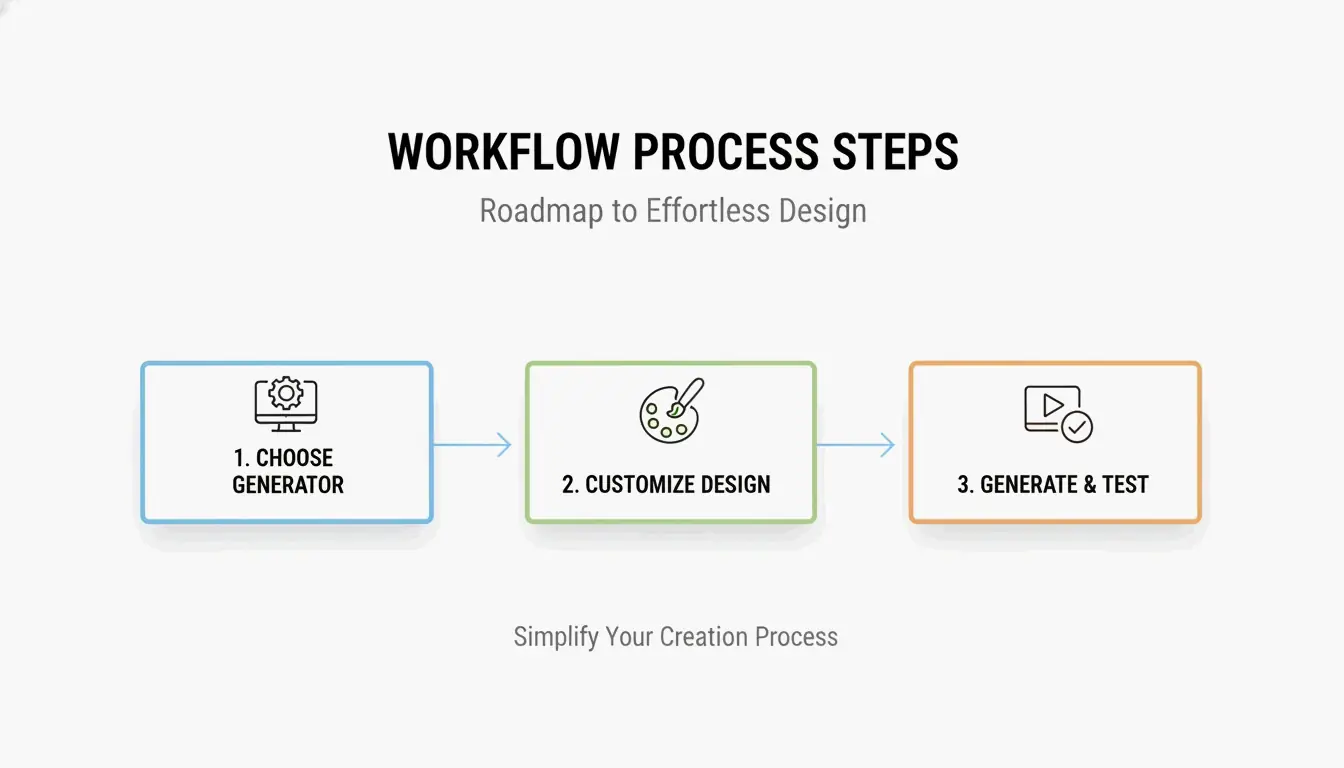
مرحلہ 1: اپنا جنریٹر منتخب کریں
| استعمال کا معاملہ | تجویز شدہ ٹول | اہم خصوصیت |
|---|---|---|
| انٹرپرائز مارکیٹنگ | Bitly کا QR Code Generator | SOC 2 Type II تعمیل، اسکین اینالیٹکس |
| تیز ذاتی لنک | Chrome کا بلٹ ان جنریٹر | تیز، اکاؤنٹ کی ضرورت نہیں |
| آرٹسٹک / برانڈڈ کوڈز | QR Code AI | AI سے بنے ڈیزائن، لوگو مکس |
| بجٹ دوست | Utlexia | مفت، اعلیٰ کنٹراسٹ آؤٹ پٹ |
پیشہ ور مارکیٹنگ کے لیے، SOC 2 Type II سرٹیفیکیشن والی پلیٹ فارم منتخب کریں — یہ خفیہ کردہ سرورز اور ڈیٹا تحفظ کی تعمیل کو یقینی بناتا ہے۔
مرحلہ 2: ڈائنامک موڈ آن کریں اور حسبِ ضرورت بنائیں
اپنا لنک (URL، PDF، WiFi اسناد، vCard) درج کرنے کے بعد، ڈائنامک QR کوڈ پر سوئچ کریں۔ پھر حسبِ ضرورت بنائیں:
- برانڈ رنگ: اپنی پیلیٹ استعمال کریں، مگر اعلیٰ کنٹراسٹ برقرار رکھیں — کسی بھی روشنی میں قابلِ اعتماد اسکین کے لیے ہلکی پسِ منظر پر گہرا پیش منظر
- لوگو کی جگہ: اپنا لوگو مرکز میں شامل کریں — ایرر کریکشن کوڈ کو فعال رکھتی ہے
- کوائیٹ زون: چاروں کناروں کے ارد گرد خالی سفید جگہ چھوڑیں؛ اس کے بغیر اسکینر کوڈ کی حد نہیں پہچان سکتے
مرحلہ 3: SVG کے طور پر ایکسپورٹ کریں اور ٹیسٹ کریں
کسی بھی پرنٹ استعمال کے لیے SVG (ویکٹر) فارمیٹ میں ایکسپورٹ کریں۔ PNG/JPG کے برعکس، SVG وزیٹنگ کارڈ سے بل بورڈ تک بالکل تیز رہتا ہے۔ لائیو جانے سے پہلے ہمیشہ کم از کم تین مختلف فون ماڈلز کے ساتھ فیلڈ ٹیسٹ کریں۔
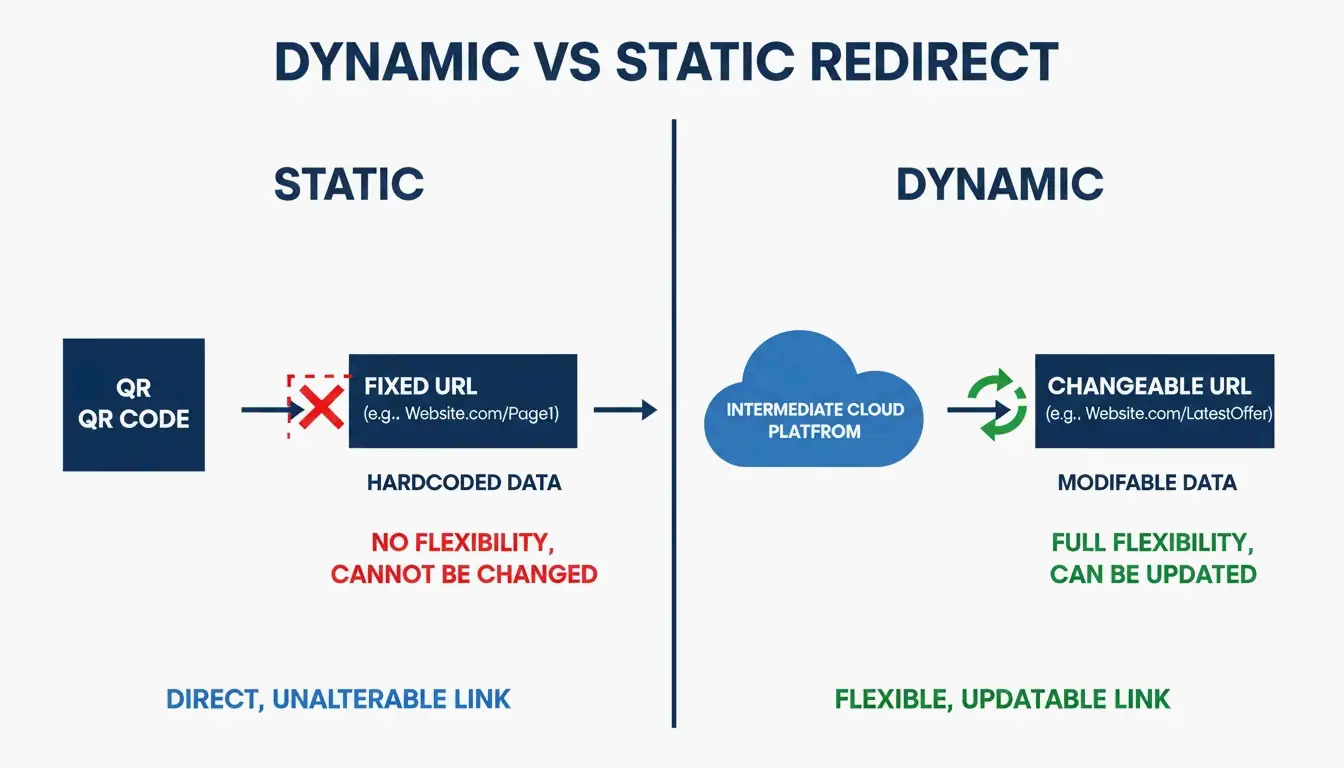
ڈائنامک بمقابلہ سٹیٹک QR کوڈز: ڈائنامک کیوں جیتتا ہے
یہ عمل کا سب سے اہم فیصلہ ہے۔
| خصوصیت | سٹیٹک QR کوڈ | ڈائنامک QR کوڈ |
|---|---|---|
| ڈیٹا | پیٹرن میں ہارڈکوڈڈ | ایک مختصر ری ڈائریکٹ لنک استعمال کرتا ہے |
| پرنٹ کے بعد قابلِ ترمیم | نہیں — دوبارہ پرنٹ ضروری | ہاں — ڈیش بورڈ سے URL بدلیں |
| اسکین اینالیٹکس | نہیں | ہاں — اسکین، مقامات، آلات |
| لاگت | مفت | سروس سبسکرپشن درکار |
| ختم | کبھی نہیں | اگر سبسکرپشن ختم ہو |
ڈائنامک کوڈز “ٹوٹے لنک” کا مسئلہ حل کرتے ہیں: اگر آپ کا URL بدلے، ڈیش بورڈ میں ری ڈائریکٹ اپ ڈیٹ کریں — 5,000 فلائیرز دوبارہ پرنٹ کرنے کی ضرورت نہیں۔ وہ اسکین اینالیٹکس بھی فراہم کرتے ہیں: کتنے لوگوں نے اسکین کیا، وہ کہاں تھے، اور کون سا آلہ استعمال کیا۔
ایرر کریکشن اور SVG: حقیقی دنیا میں کوڈز کو کام کروانا
QR کوڈز کو خمیدہ سطحوں، مدھم روشنی، اور طبعی نقصان میں زندہ رہنا چاہیے۔ ریڈ-سولومن ایرر کریکشن کوڈ کو تب بھی فعال رکھتی ہے جب اس کی سطح کا 30% خراب یا ڈھکا ہو — یہی مرکز میں لوگو رکھنے کی بھی اجازت دیتا ہے۔
| لیول | بحالی | بہترین برائے |
|---|---|---|
| L (کم) | 7% | ڈیٹا صلاحیت کو زیادہ سے زیادہ کریں |
| M (متوسط) | 15% | عمومی مارکیٹنگ |
| Q (چوتھائی) | 25% | آؤٹ ڈور / صنعتی استعمال |
| H (زیادہ) | 30% | لوگو کی جگہ، مشکل ماحول |
QR Code AI کے مطابق، لوگو کے ساتھ کسٹم برانڈڈ ڈیزائن سادہ سفید و سیاہ پیٹرنز کے مقابلے میں اوسطاً 30% زیادہ اسکین لاتے ہیں۔ لوگو شامل کرتے وقت لیول H استعمال کریں۔
سیکیورٹی: quishing (QR فشنگ) سے تحفظ
جیسے جیسے QR کا استعمال بڑھا، quishing — حملہ آوروں کا جائز QR کوڈز کو نقصان دہ اسٹیکرز سے ڈھانپ کر اسناد چرانا — بھی بڑھا۔
تحفظ کی چیک لسٹ
- SOC 2 Type II کے مطابق جنریٹرز استعمال کریں — خفیہ کردہ ری ڈائریکٹ آپ کے صارفین کی حفاظت کرتا ہے
- کسٹم ڈومینز آن کریں — صارفین صفحہ لوڈ ہونے سے پہلے URL پیش نظارے میں آپ کا برانڈ نام دیکھتے ہیں
- اسکین ڈیٹا نگرانی کریں — اینالیٹکس میں غیر معمولی جغرافیائی اضافہ کاپی شدہ کوڈ کی نشاندہی کر سکتا ہے
- ایسے URL شارٹنرز سے بچیں جن پر آپ کنٹرول نہیں رکھتے — وہ غیر قابلِ اعتماد ری ڈائریکٹ پرت شامل کرتے ہیں
ٹیلر سفٹ کا شکاگو میورل — البم لانچ کا اشارہ دینے والا ایک دیوہیکل QR کوڈ — دکھاتا ہے کہ نمایاں مہمات کیسے ہدف بنتی ہیں۔ کسٹم ڈومین استعمال کریں تاکہ صارفین اسکین سے پہلے منزل کی تصدیق کر سکیں۔
پیمانے پر آٹومیشن: API اور Zapier انضمام
سینکڑوں اثاثوں کو ایک ایک کر کرے سنبھالنا توسیع پذیر نہیں۔ Bitly اور Uniqode جیسی پلیٹ فارمز بلک جنریشن کے لیے API انضمام پیش کرتی ہیں۔
آٹومیشن ورک فلو
- ٹرگر: CRM میں نیا پروڈکٹ شامل، یا فائل Google Drive پر اپ لوڈ
- ایکشن: Zapier API کے ذریعے منفرد ڈائنامک QR کوڈ جنریٹ کرتا ہے
- آؤٹ پٹ: کوڈ خودکار طور پر آپ کے اسکین اینالیٹکس ڈیش بورڈ میں شامل ہو جاتا ہے
یہ دستی تخلیق ختم کرتا ہے اور آپ کی ٹیم کو تمام اثاثوں میں ریئل ٹائم اسکین ڈیٹا دیتا ہے۔
نتیجہ
2026 میں پیشہ ور QR کوڈ بنانا ڈیزائن، لچک، اور سیکیورٹی کے درمیان توازن مطلب رکھتا ہے۔ ترامیم اور اینالیٹکس کے لیے ڈائنامک کوڈ استعمال کریں، مناسب کوائیٹ زون کے ساتھ اعلیٰ کنٹراسٹ برقرار رکھیں، پرنٹ کے لیے SVG کے طور پر ایکسپورٹ کریں، اور SOC 2 کے مطابق جنریٹر منتخب کریں۔ لوگو کے ساتھ کسٹم برانڈڈ ڈیزائن اسکینز کو 30% بڑھاتے ہیں — مگر لانچ سے پہلے ہمیشہ متعدد آلات کے ساتھ فیلڈ ٹیسٹ کریں۔
اکثر پوچھے جانے والے سوالات
کیا مفت QR کوڈز کبھی ختم ہوتے ہیں؟
سٹیٹک QR کوڈز کبھی ختم نہیں ہوتے — ڈیٹا پیٹرن میں مستقل مرمّز ہے۔ڈائنامک QR کوڈز تب کام کرنا بند کر سکتے ہیں جو پرووائیڈر کی ٹرائل ختم ہو، اکاؤنٹ حذف ہو، یا اسکین کی حد پہنچ جائے۔ اگر آپ کو طویل مدتی ڈائنامک فعالیت چاہیے تو سروس کی شرائط چیک کریں۔
وزیٹنگ کارڈ پر QR کوڈ کا کم سے کم سائز کیا ہے؟
0.8 × 0.8 انچ (2 × 2 سینٹی میٹر) اسمارٹ فون سے قابلِ اعتماد اسکین کے لیے تجویز کردہ کم سے کم ہے۔ اسکینر کوڈ کی حد پہچان سکے، اس کے لیے تمام کناروں کے ارد گرد واضح کوائیٹ زون (خالی پیڈنگ) برقرار رکھیں۔
پرنٹنگ میں PNG اور SVG میں کیا فرق ہے؟
PNG ایک راسٹر فارمیٹ ہے (پکسلز) — بڑا کرنے پر دھندلا ہو جاتا ہے۔SVG ایک ویکٹر فارمیٹ ہے (ریاضیاتی راستے) — ہر پیمانے پر بالکل تیز رہتا ہے۔ فلائیرز، پوسٹرز، اور پیکیجنگ پر پیشہ ورانہ پرنٹنگ کے لیے ہمیشہ SVG استعمال کریں۔
متعلقہ پوسٹس
فونٹ جنریٹر: 2026 میں اسٹائلڈ ٹیکسٹ کا مکمل نقشہ
جمالیاتی فونٹ جنریٹر: اسٹائلسھ یونیکوڈ ٹیکسٹ کی مکمل رہنمائی
کیلیگرافی فونٹ جنریٹر: خوبصورت ٹیکسٹ اسٹائلز کے لیے مفت آن لائن ٹول