بہترین Markdown ٹیبل جنریٹر: Excel، CSV اور JSON کو GFM میں تیزی سے تبدیل کریں
فوری خلاصہ
- کیا آپ کو کوئی اسپریڈ شیٹ، CSV یا JSON فائل کو صاف Markdown ٹیبل میں بدلنا ہے؟ یہ رہنمائی 2026 کے بہترین ٹولز پیش کرتی ہے
- کیا آپ کو کوئی اسپریڈ شیٹ، CSV یا JSON فائل کو صاف ستھرے Markdown ٹیبل میں بدلنا ہے؟ 2026 میں یہ عمل کافی آسان ہو چکا ہے — صحیح ٹول کا انتخاب اس بات پر منحصر ہے کہ آپ محض ایک فوری تبدیلی کرنا چاہتے ہیں یا دستا.
- ایک نظر میں بہترین ٹولز
ایڈیٹوریل عمل
SectoJoy کے ذریعے reviewed اور 21 جون 2026 کو شائع کیا گیا۔ یہ مضمون اس وقت تازہ کیا جاتا ہے جب پروڈکٹ تفصیلات، مثالیں، یا ٹول رہنمائی تبدیل ہوتی ہے۔ آخری اپ ڈیٹ 21 جون 2026۔
SectoJoy
میں ایک آزاد ڈویلپر ہوں جو iOS اور ویب ایپلیکیشنز بنا رہا ہوں، عملی SaaS پروڈکٹس بنانے پر توجہ مرکوز کرتا ہوں۔ میں AI SEO میں مہارت رکھتا ہوں اور مسلسل یہ دریافت کر رہا ہوں کہ ذہین ٹیکنالوجیز کیسے پائیدار نمو اور کارکردگی کو فروغ دے سکتی ہیں۔
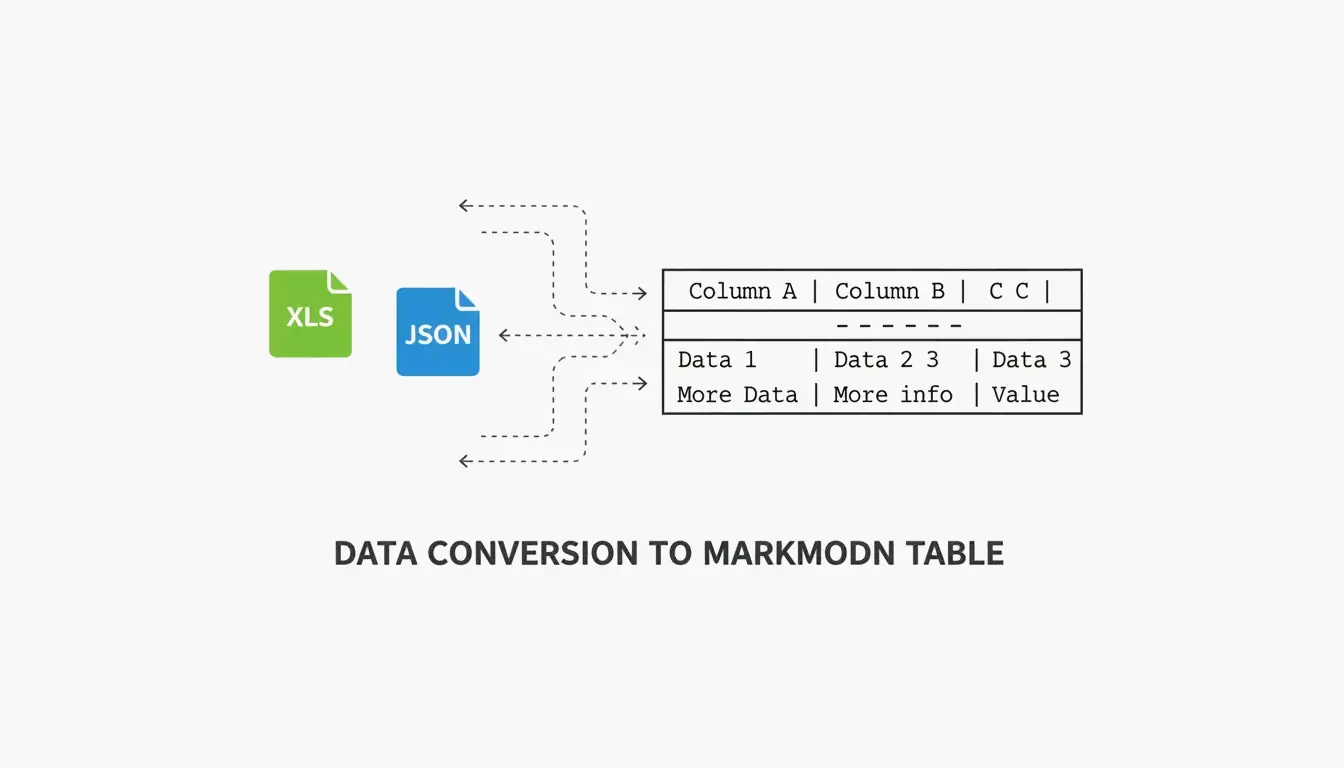
کیا آپ کو کوئی اسپریڈ شیٹ، CSV یا JSON فائل کو صاف ستھرے Markdown ٹیبل میں بدلنا ہے؟ 2026 میں یہ عمل کافی آسان ہو چکا ہے — صحیح ٹول کا انتخاب اس بات پر منحصر ہے کہ آپ محض ایک فوری تبدیلی کرنا چاہتے ہیں یا دستاویزات کو بڑے پیمانے پر خودکار بنانا چاہتے ہیں۔
یہ رہنمائی ہر صورتحال کے بہترین ٹولز پر روشنی ڈالتی ہے: دستی کام کے لیے بصری ایڈیٹرز، آٹومیشن کے لیے CLI ٹولز، اور اپنے کوڈ بیس کے ساتھ دستاویزات ہم وقت رکھنے کے لیے CI/CD انٹیگریشن۔
ایک نظر میں بہترین ٹولز
| Tool | Best For | Type | Key Strength |
|---|---|---|---|
| TableGenerator.com | Quick visual edits | Web (client-side) | Grid-based editor, alignment controls |
| AnywayData | Messy JSON files | Web / library | Flattening nested structures, AST parsing |
| MarkItDown (Microsoft) | Excel/Word automation | Python CLI | Preserves headers and table grids from Office files |
| Pandoc | Multi-format conversion | CLI | Supports dozens of formats, stable at scale |
| EaseCloud | Excel → GFM | Web | Simple browser-based converter |
| GoConverter | Excel → GFM | Web | Fast conversion with alignment options |
DasRoot (2026) کے مطابق، جدید Markdown ٹولز درمیانے سائز کے ڈیٹا سیٹس کے لیے 15–30 ٹیبلز فی سیکنڈ پر عمل درآمد کر سکتے ہیں — اور بہترین ٹولز کلائنٹ سائڈ پروسیسنگ استعمال کرتے ہیں، یعنی آپ کا ڈیٹا کبھی آپ کے براؤزر سے باہر نہیں جاتا۔
GFM تعمیل کیوں اہم ہے
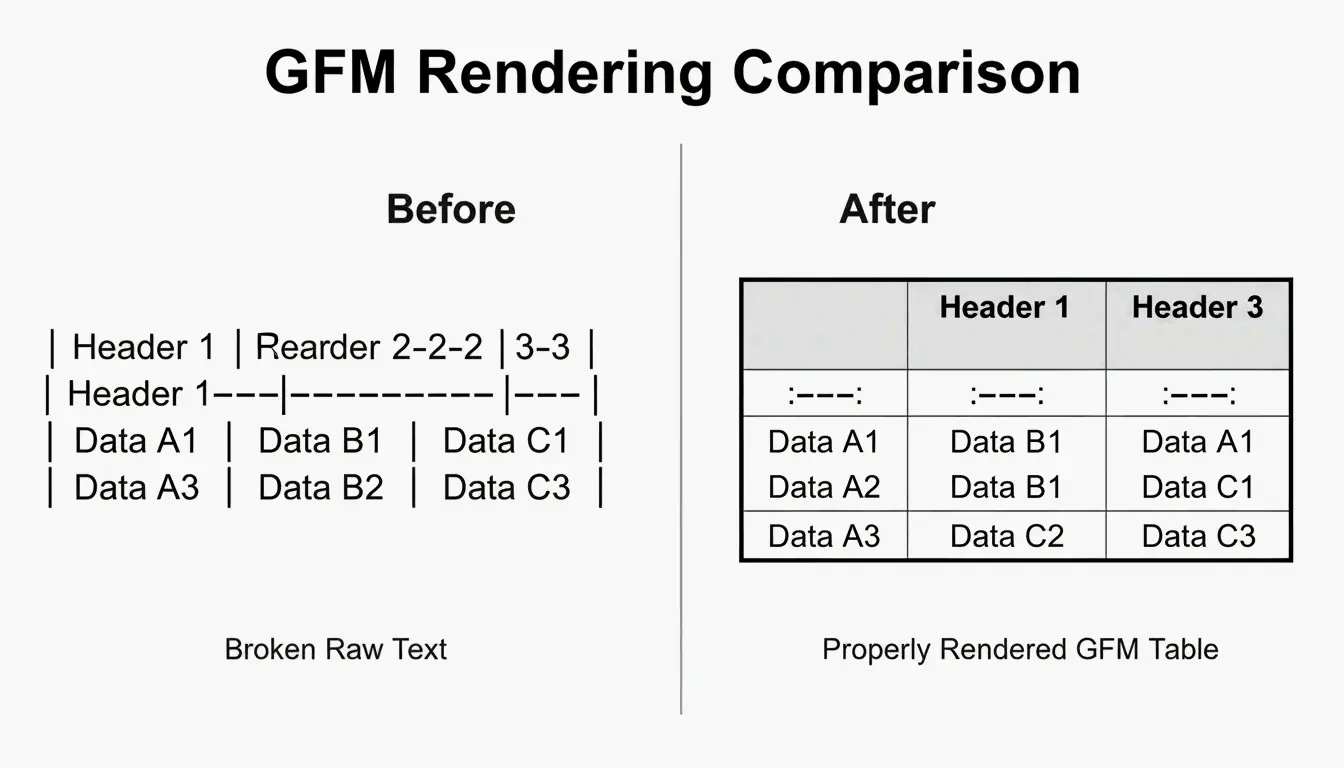
GitHub Flavored Markdown (GFM) وہ مخصوص لہجہ ہے جسے GitHub، GitLab اور Discord استعمال کرتے ہیں۔ اصل Markdown اسپیک میں ٹیبلز کی سپورٹ ہی نہیں تھی — GFM نے وہ جانا پہچانا “pipe-and-dash” نحو متعارف کرایا۔ ایک GFM کے مطابق جنریٹر یہ یقینی بناتا ہے کہ آپ کے ٹیبلز بولڈ ہیڈرز اور ترتیب شدہ کالموں کے ساتھ درست رینڈر ہوں، بجائے اس کے کہ خام متن کی طرح نظر آئیں۔
Excel اور CSV کو GFM میں کیسے بدلیں
یہ عمل دو مرحلوں پر مشتمل ہے:
- CSV میں ایکسپورٹ کریں — اپنی Excel یا Google Sheets فائل کو CSV کے طور پر محفوظ کریں۔ اس سے بھاری فارمیٹنگ تو ہٹ جاتی ہے لیکن ڈیٹا گرڈ محفوظ رہتا ہے۔
- تبدیلی — کوئی براؤزر بیسڈ ٹول جیسے EaseCloud یا GoConverter استعمال کریں تاکہ GFM کوڈ تیار ہو سکے۔
کالم کی ترتیب (Column Alignment)
GFM علیحدگی والی قطار (ہیڈر کے نیچے والی لائن) کے ذریعے ترتیب کنٹرول کرتا ہے:
| Syntax | Alignment |
|---|---|
:--- |
Left-aligned (default) |
---: |
Right-aligned |
:---: |
Center-aligned |
پائپ کریکٹرز سے بچنا (Escaping Pipe Characters)
Markdown | کا استعمال کالم کے کناروں کو نشان زد کرنے کے لیے کرتا ہے۔ اگر آپ کے ڈیٹا میں کوئی پائپ موجود ہے (مثلاً کسی کوڈ سنپ یا فارمولے میں)، تو یہ ٹیبل کو توڑ دے گا۔ اسے درج ذیل طریقوں سے ایسکیپ کریں:
- HTML entity:
| - بیک سلیش:
\| - کوڈ بیک ٹکس:
`|`
بڑے ڈیٹا سیٹس سے نمٹنا (100+ Rows)
100 سے زائد قطاروں والے ڈیٹا سیٹس کے لیے، ویب بیسڈ بصری ایڈیٹرز میں تاخیر (lag) ہو سکتی ہے۔ جدید کنورٹرز انکریمنٹل پارسنگ استعمال کر کے جوابدہ رہتے ہیں۔ AnywayData کے مطابق، “جوڑے دار امتزاجی ڈیٹا منطق” کے استعمال سے ضروری ٹیسٹ کیسز کو 90–99% تک کم کیا جا سکتا ہے، جو پیچیدہ کنفیگریشنز کی دستاویز سازی میں معاون ثابت ہوتا ہے۔
واقعی بڑے ڈیٹا سیٹس کے لیے، متعدد ٹیبلز میں تقسیم کرنے یا Markdown ورژن کے ساتھ ڈاؤن لوڈ قابل CSV لنک فراہم کرنے پر غور کریں۔
JSON کو GFM میں بدلنا: نیسٹڈ ڈیٹا کو فلیٹ کرنا
JSON درخت نما ہوتا ہے — ڈیٹا روسی گڑیوں کی طرح ایک دوسرے میں سموتا ہوا۔ Markdown ٹیبلز فلیٹ دو جہتی (2D) گرڈ ہوتے ہیں۔ تبدیلی کے لیے فلیٹ کرنے والی منطق درکار ہوتی ہے:
user.address.city → "User Address City" (single column header)
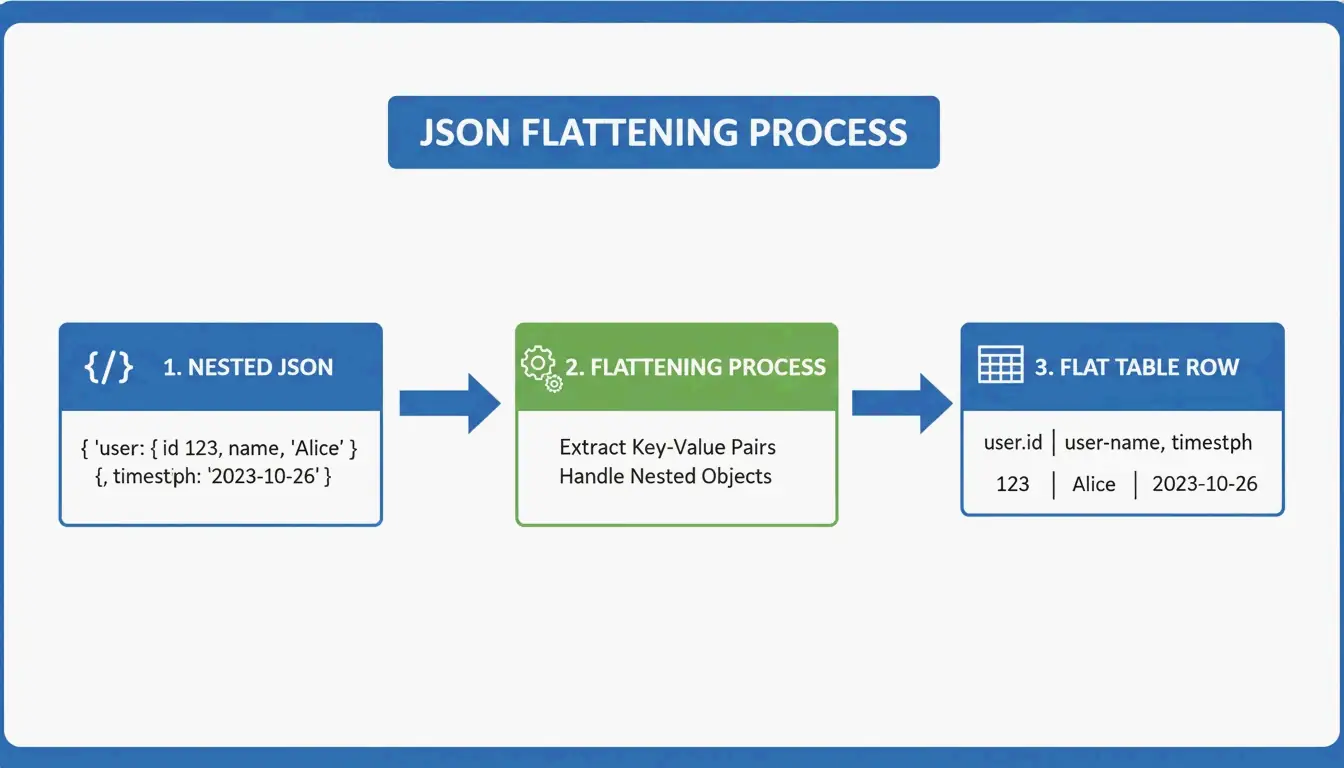
AnywayData کا Grid Table Editor اس معاملے میں ممتاز ہے — یہ آپ کو JSON امپورٹ کرنے اور نیسٹڈ تہوں کو کیسے فلیٹ کیا جائے اس پر دستی کنٹرول دیتا ہے۔ تبدیلی کا معیار اس بات پر منحصر ہے کہ ٹول سادہ متن پیٹرن میچنگ کے بجائے AST (Abstract Syntax Tree) کی تعمیر استعمال کرتا ہے یا نہیں۔ AST بیسڈ پارسرز ڈیٹا ڈھانچے کا منطقی نقشہ بناتے ہیں، گہری نیسٹنگ اور غیر مستقل اسکیموں کو کہیں زیادہ درست طریقے سے سنبھالتے ہیں۔
CI/CD کے ساتھ آٹومیشن
انجینئرنگ ٹیموں کے لیے، دستی تبدیلی وقت کا ضیاع ہے۔ ٹیبل جنریشن کو اپنے CI/CD pipeline میں شامل کرنے سے README فائلیں خود بخود رواں دواں رہتی ہیں:
- بلڈ پروسیس کے دوران JSON API ریسپانسز کو GFM میں بدلیں
- دستاویزات کو کوڈ کے طور پر تسلیم کریں — آپ کے ڈیٹا کی تبدیلی پر یہ بھی اپڈیٹ ہوں
- اپنے ریپو میں پرانی یا غلط معلومات والی عام خرابی سے بچیں
جیسے Terraform-docs v0.17.0 (2026) جیسے ٹولز خودکار طور پر ریسورس ٹیبلز براہ راست README فائلوں میں شامل کر دیتے ہیں — جس سے ثابت ہوتا ہے کہ انفراسٹرکچر لیول کی دستاویز سازی کے لیے CLI ٹولز اکثر ویب انٹرفیس سے بہتر کارکردگی دکھاتے ہیں۔
MarkItDown بمقابلہ Pandoc: آپ کو کون سا استعمال کرنا چاہیے؟
| Factor | MarkItDown (Microsoft) | Pandoc |
|---|---|---|
| Optimized for | Office files (Excel, Word) | Universal document conversion |
| Markdown flavors | GFM-focused | CommonMark, GFM, and many others |
| Best for | Quick XLSX → GitHub table | Multi-format, high-volume CLI work |
| Latest version | 2026 | 3.9.0.2 (stable) |
| Speed | Faster for single Office files | Better for batch processing |
| Use when | You need one Excel file converted | You need to convert between dozens of formats |
زیادہ تر ڈویلپرز کے لیے، عام کیس (Excel → GitHub table) میں MarkItDown تیز ہے۔ جب آپ متعدد دستاویزی فارمیٹس کے ساتھ کام کر رہے ہوں یا بڑے پیمانے پر بیچ کنورژن چلا رہے ہوں تو Pandoc بہتر انتخاب ہے۔
نتیجہ
2026 میں ڈیٹا کو GFM ٹیبلز میں بدلنا حجم اور ورک فلو پر منحصر ہے:
- وقتی ترامیم → بصری کنٹرول کے لیے TableGenerator.com یا AnywayData
- بار بار ہونے والی Office تبدیلیاں → اپنے Python ورک فلو میں شامل MarkItDown
- ملٹی فارمیٹ یا ہائی والیم → CLI بیچ پروسیسنگ کے لیے Pandoc
- انفراسٹرکچر دستاویزات → terraform-docs یا حسب ضرورت اسکرپٹس کے ساتھ CI/CD آٹومیشن
بنیادی اصول یہ ہے: دستاویزات اس وقت اپڈیٹ ہونی چاہئیں جب آپ کا ڈیٹا اپڈیٹ ہو۔ تبدیلی کو خودکار بنانے سے پرانے ٹیبلز سے بچا جا سکتا ہے اور آپ کے پروجیکٹ کی دستاویزات قابلِ اعتماد رہتی ہیں۔
اکثر پوچھے جانے والے سوالات
میں Markdown ٹیبل کے خلیے کے اندر پائپ کریکٹرز (|) سے کیسے بچوں؟
حرفی پائپ کے بجائے HTML entity | استعمال کریں۔ متبادل کے طور پر، اگر آپ کا GFM پارسر سپورٹ کرتا ہو تو بیک سلیش ایسکیپ \| استعمال کریں، یا مواد کو کوڈ بیک ٹکس میں لپیٹ دیں۔ تینوں طریقوں سے پائپ کریکٹر کالم سیپریٹر کے طور پر سمجھا جانے سے بچ جاتا ہے۔
کیا GFM مرج شدہ خلیوں (merged cells) یا ملٹی لائن مواد کی سپورٹ کرتا ہے؟
نہیں۔ معیاری GFM میں colspan یا rowspan کی سپورٹ نہیں ہے۔ ہر خلیہ آزاد ہونا چاہیے۔ کسی خلیے کے اندر ملٹی لائن مواد کے لیے HTML <br> ٹیگز کا استعمال کریں تاکہ لائن بریکز لگائے جا سکیں، جبکہ ڈیٹا ایک ہی قطار میں محفوظ رہے۔
100 سے زائد قطاروں والے ڈیٹا سیٹس کے لیے بہترین طریقہ کیا ہے؟
ویب بیسڈ بصری ایڈیٹرز کو چھوڑ دیں (ان میں تاخیر ہوگی)۔ اس کے بجائے CLI ٹولز جیسے MarkItDown یا Pandoc استعمال کریں۔ اگر نتیجے میں بننے والا ٹیبل ایک صفحے کے لیے بہت بڑا ہو، تو اسے متعدد ٹیبلز میں تقسیم کریں یا پڑھنے کی سہولت برقرار رکھنے کے لیے ڈاؤن لوڈ قابل CSV فائل کا لنک فراہم کریں۔
متعلقہ پوسٹس
فونٹ جنریٹر: 2026 میں اسٹائلڈ ٹیکسٹ کا مکمل نقشہ
جمالیاتی فونٹ جنریٹر: اسٹائلسھ یونیکوڈ ٹیکسٹ کی مکمل رہنمائی

کیلیگرافی فونٹ جنریٹر: خوبصورت ٹیکسٹ اسٹائلز کے لیے مفت آن لائن ٹول