2026年のXboxゲーマータグ文字数制限:ルール、費用、12文字ルールのすべて
クイックサマリー
- Xboxゲーマータグは、Xboxネットワーク全体であなたの
- Xboxゲーマータグは、Xboxネットワーク全体であなたのアイデンティティです。マルチプレイロビー、フレンドリスト、実績フィードなど、あらゆる場所に表示される名前です。2026年に変更を考えているなら、知っておくべき重要.
- 2026年の12文字制限について
編集方針
SectoJoy が確認し、2026年5月16日 に公開しました。製品の詳細、例、ツールの使い方が変わった場合はこの記事を更新します。最終更新日: 2026年5月16日。
SectoJoy
私はiOS・Webアプリケーションを開発するインディーハッカーで、実用的なSaaS製品の開発に注力しています。AI SEOを専門とし、インテリジェント技術が持続可能な成長と効率をどう促進できるかを常に探求しています。
Xboxゲーマータグは、Xboxネットワーク全体であなたのアイデンティティです。マルチプレイロビー、フレンドリスト、実績フィードなど、あらゆる場所に表示される名前です。2026年に変更を考えているなら、知っておくべき重要なルールがあります。すべての新しいゲーマータグはスペースを含めて最大12文字までです。
Xbox 360時代のレガシー「クラシックゲーマータグ」は、今でも最大15文字まで可能です。ただし、現在のシステムに移行後に一度も変更されていない場合に限ります。名前を変更すると、元の長さに戻ることはありません。
このガイドでは、現在の文字数制限、サフィックスシステムの仕組み、変更費用、そして短くて覚えやすい名前を見つけるコツまで、すべてを解説します。
2026年の12文字制限について
Xboxの新しいゲーマータグ(新規アカウント作成時も既存アカウントの名前変更時も)は、すべて12文字以内に収める必要があります。CodeItBroによると、この基準はXbox 360時代の旧15文字制限に代わるもので、より統一的でグローバルな命名システムを構築するために導入されました。
この制限はエコシステム全体に適用されます:
– Xbox Series X|S本体
– Xbox One本体
– PC版Xboxアプリ
– Xboxモバイルアプリ(iOS・Android)
2023年初頭時点でネットワークのアクティブユーザー数は1億2000万人を超えており(Wikipedia)、本当にユニークな名前を見つけるのは年々難しくなっています。この問題に対応するため、Xboxはラテン文字以外のスクリプトやアルファベットをサポートするようになりましたが、それらも12文字の表示ウィンドウに収まる必要があります。
サフィックスシステム:重複名の仕組み
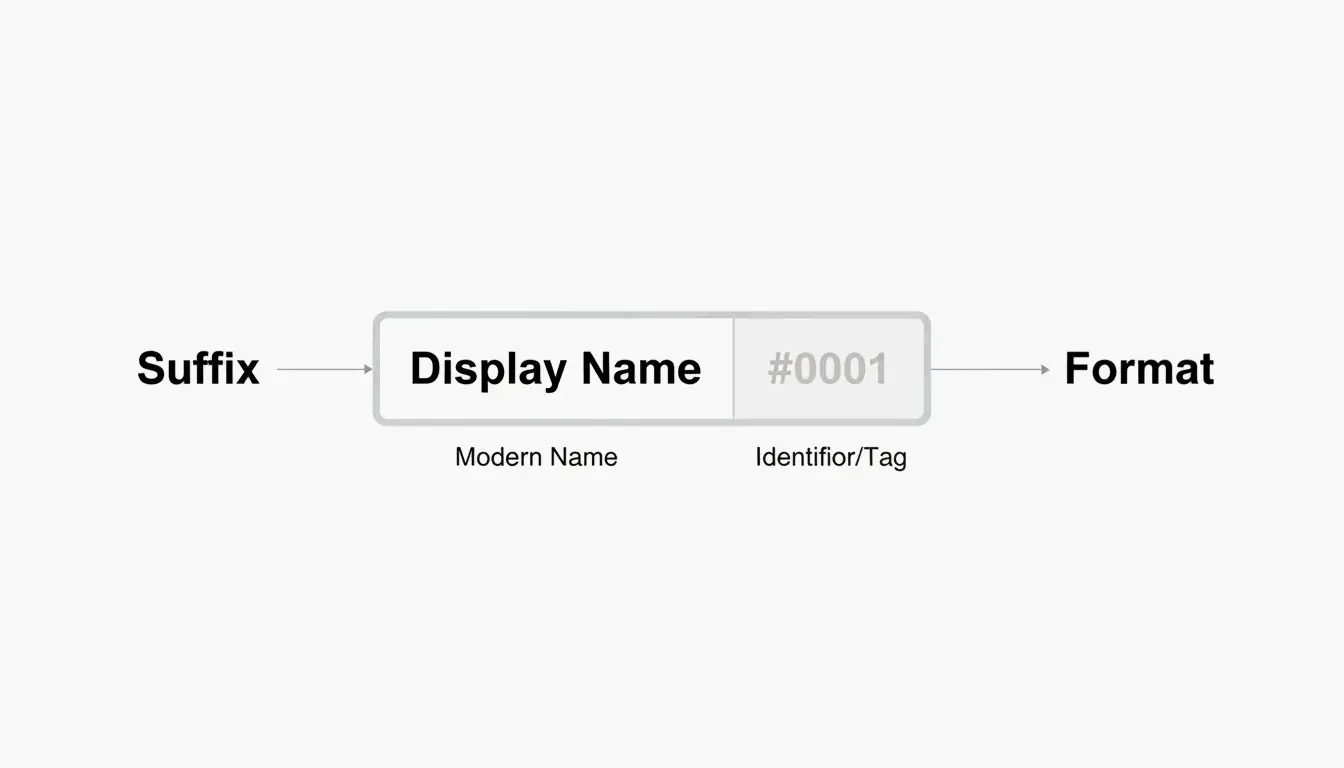
ここが面白いところです。希望の名前がすでに使われている場合でも、その名前を使うことができます。Xboxがハッシュタグ付きサフィックス(#1234など)を追加して、先に登録していた人と区別する仕組みです。
サフィックスについて知っておくべきポイント:
– 自動的に割り当てられます — 数字を自分で選ぶことはできません。
– 12文字の制限にはカウントされません。
– ほとんどのゲームUIでは小さいフォントで表示されるため、メインの名前は見た目がすっきりします。
– フレンドはベース名だけで検索してあなたを見つけることができます。
つまり、「ShadowWalker」というフルネームは「ShadowWalker#9999」と表示されますが、12文字に収める必要があるのは「ShadowWalker」の部分だけです。
「引き返せないポイント」:クラシックタグとモダンタグ
2026年に名前を変更する前に理解しておくべき最も重要なことです。
現在のゲーマータグが2019年のアップデート以前に作成され、12文字より長い場合、変更するとその余分な文字数を永久に失うことになります。一方通行のドアだと考えてください。
Microsoft Q&Aによると、一度新しいシステムに移行すると、クラシックの長さに戻す技術的な方法はありません。現在のインフラストラクチャは、12文字を超えるタグの作成をサポートしていません。レガシーユーザーであっても同じです。
2026年の実際の事例
2026年4月、Armonsterという名前のユーザーが、名前変更後に13文字のレガシータグを復元しようとしました。システムはリクエストを完全にブロックしました。その名前は元々彼のものでしたが、現在のシステムでは12文字を超えるタグを処理できなかったのです。
結論: お気に入りの13〜15文字のクラシックゲーマータグを持っているなら、変更する前に慎重に考えましょう。
Xboxゲーマータグの変更方法(ステップバイステップ)
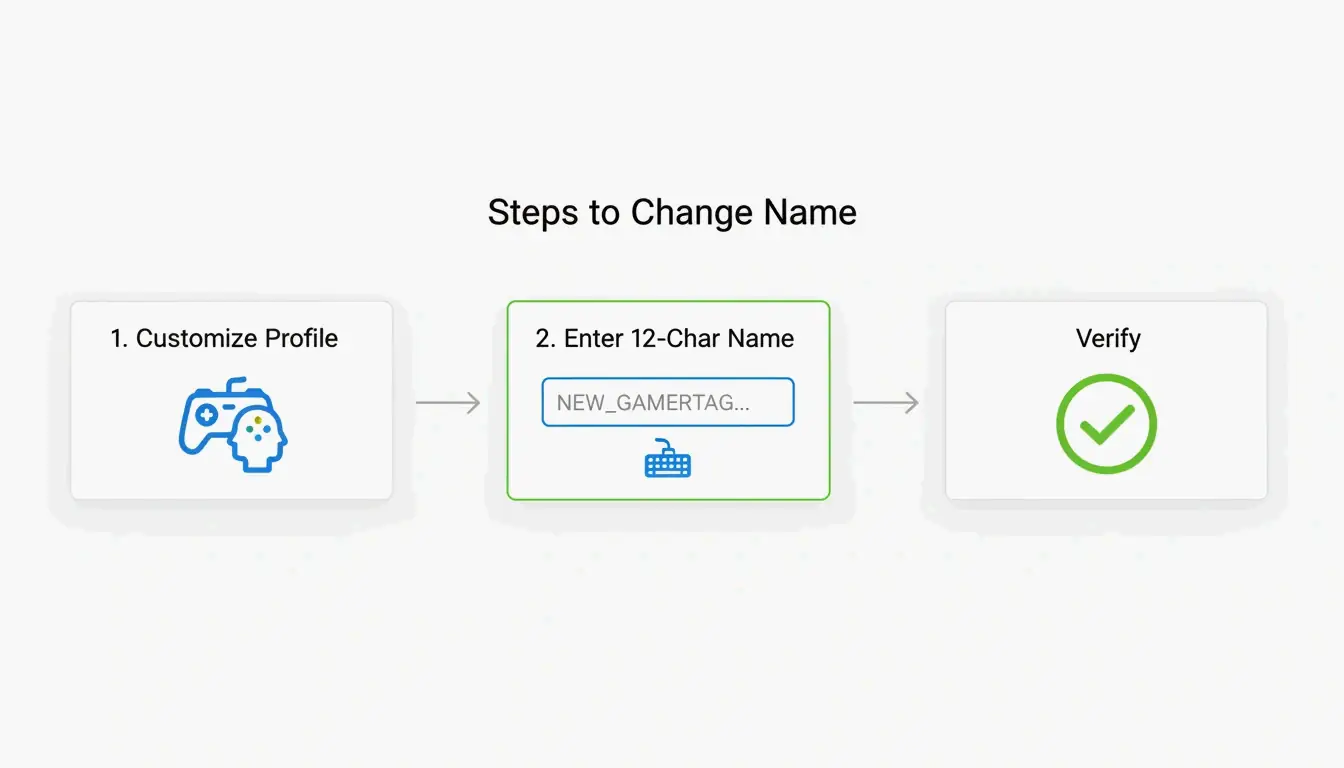
本体でもスマホでも、手順はシンプルです。入力中にリアルタイムで名前の空き状況を確認できます。
本体で変更する場合(Xbox Series X|S)
- コントローラーのXboxボタンを押します。
- プロフィールとシステムに移動します。
- プロフィールを選択し、プロフィールのカスタマイズを開きます。
- 現在のゲーマータグをクリックします。
- 新しい名前を入力します(最大12文字)。
- 変更を確認します。
Xboxモバイルアプリで変更する場合
- Xboxアプリを開きます。
- プロフィール画像をタップします。
- 設定 → ゲーマータグの編集に移動します。
- 新しい名前を入力して確認します。
確認について
Theportablegamerによると、名前が利用可能な場合は緑色のチェックマークが、すでに使用されている場合は赤いバツ印が表示されます。使用されている場合、システムは自動的にサフィックス付きバージョンを提案します。
トラブルシューティング:確認ループ
2026年、一部のプレイヤーが「確認ループ」に陥る問題を報告しています。アプリが名前変更を完了せずに何度もサインインを要求する状態です。この場合の対処法:
- アプリのキャッシュをクリア(設定 → アプリ → Xbox → キャッシュをクリア)。
- account.xbox.comのウェブブラウザから変更を試みます。
- 執行ステータスを確認します — アクティブなBANやストライクがある場合、ペナルティの期限が切れるまで名前の変更はブロックされます。
ゲーマータグの変更費用は?
Microsoftはシンプルな料金体系を採用しています:
| 変更内容 | 費用 |
|---|---|
| 初回変更(新規アカウント) | 無料 |
| 2回目以降の変更 | 9.99米ドル または 800 Microsoftポイント |
| 変更間のクールダウン | 30日間 |
この料金は悪用を防ぐためのものです。料金がなければ、モデレーションを回避したり他のプレイヤーを混乱させたりするために、頻繁に名前を変更する人が現れるでしょう。Theportablegamerが指摘するように、この価格は長年変わっていません。
レアネーム狩り:4文字ゲーマータグの見つけ方
短いゲーマータグ、特に4文字のものは究極のレアアイテムです。見た目がすっきりし、サフィックスが不要で、覚えやすいのが特徴です。
現実として、ほとんどの4文字の英単語は何年も前に取得されています。しかし、粘り強く探せばまだ選択肢はあります:
- 英数字の組み合わせ — 文字と数字を混ぜる(例:「K7VR」「N3XT」)。
- 辞書にない言葉 — 発音できるが実在の単語ではない、ユニークな文字の組み合わせ。
- ジェネレーターツール — CodeItBroゲーマータグジェネレーターには、短いハンドルネームの空き状況を確認する「Hunt 4-Letter Tags」モードがあります。
理想の4文字ネームがすでに取得されている場合、サフィックスシステムが頼りになります。サフィックスはほとんどのゲームメニューで小さいフォントで表示されるため、「Raven#3847」のような名前でも画面上は比較的すっきり見えます。
まとめ
12文字制限は、2026年のXboxネットワークにおける確固たる標準です。サフィックスシステムにより、他の人と同じ表示名を共有することは可能ですが、新しいゲーマータグや変更されたゲーマータグに対する長さの制限自体は交渉の余地がありません。
変更する前に:
– 文字数を慎重に数えましょう — スペースを含めて最大12文字です。
– クラシックタグを大切に — お気に入りのレガシー15文字ネームがあるなら、変更する前に慎重に考えましょう。戻ることはできません。
– 費用の予算を立てましょう — 最初の変更は無料ですが、それ以降は9.99ドルで、30日間のクールダウンがあります。
よくある質問
12文字のモダンタグから15文字のクラシックタグに戻すことはできますか?
いいえ。一度モダンシステムに移行すると、15文字のレガシーオプションは永久に失われます。タグを以前の長さに戻すツール、設定、サポート窓口は一切ありません。
2026年でも15文字の名前を持っているプレイヤーがいるのはなぜですか?
それは2019年のシステムアップデートより前に作成された「クラシックゲーマータグ」です。これらのプレイヤーが名前を変更しない限り、古い長さは維持されます。しかし、一度でも変更すると — タイプミスの修正であっても — 12文字システムに移行されます。
Xboxゲーマータグで使用できる特殊文字は何ですか?
スペースは使用可能で、12文字のうちの1文字としてカウントされます。数字も問題ありません。ほとんどの特殊記号(!、@、#、%など)は、すべてのXboxゲームとの互換性を維持するためブロックされています。#記号はシステム生成のサフィックス専用に予約されており、名前自体には使用できません。
関連記事
フォントジェネレーター:2026年の装飾テキスト完全マップ
アestheticフォントジェネレーター完全ガイド:おしゃれなUnicodeテキスト

カリグラフィーフォントジェネレーター:エレガントなテキストスタイルを作れる無料オンラインツール