
PSN Name Generate Guide: How to Create a Unique PlayStation ID in 2026
To PSN name generate the perfect ID, you should use an […]
To PSN name generate the perfect ID, you should use an AI tool to filter by style—like pro, tryhard, or funny—while sticking to the 3-16 character limit. Focus on readability, skip the overused number strings, and stay safe by avoiding trademarked terms. Testing small tweaks like underscores or phonetic spellings is the best way to find a name that’s actually available on the PlayStation Network.
Mastering the PSN Name Generate Process: Rules and Limits
Securing a unique identity on the PlayStation Network is about balancing your creative side with Sony’s technical rules. With over 118 million active PSN accounts as of 2026, finding a short, clean handle is harder than it used to be. Your Online ID is your permanent digital footprint; it tells teammates and rivals exactly who you are before the match even starts.
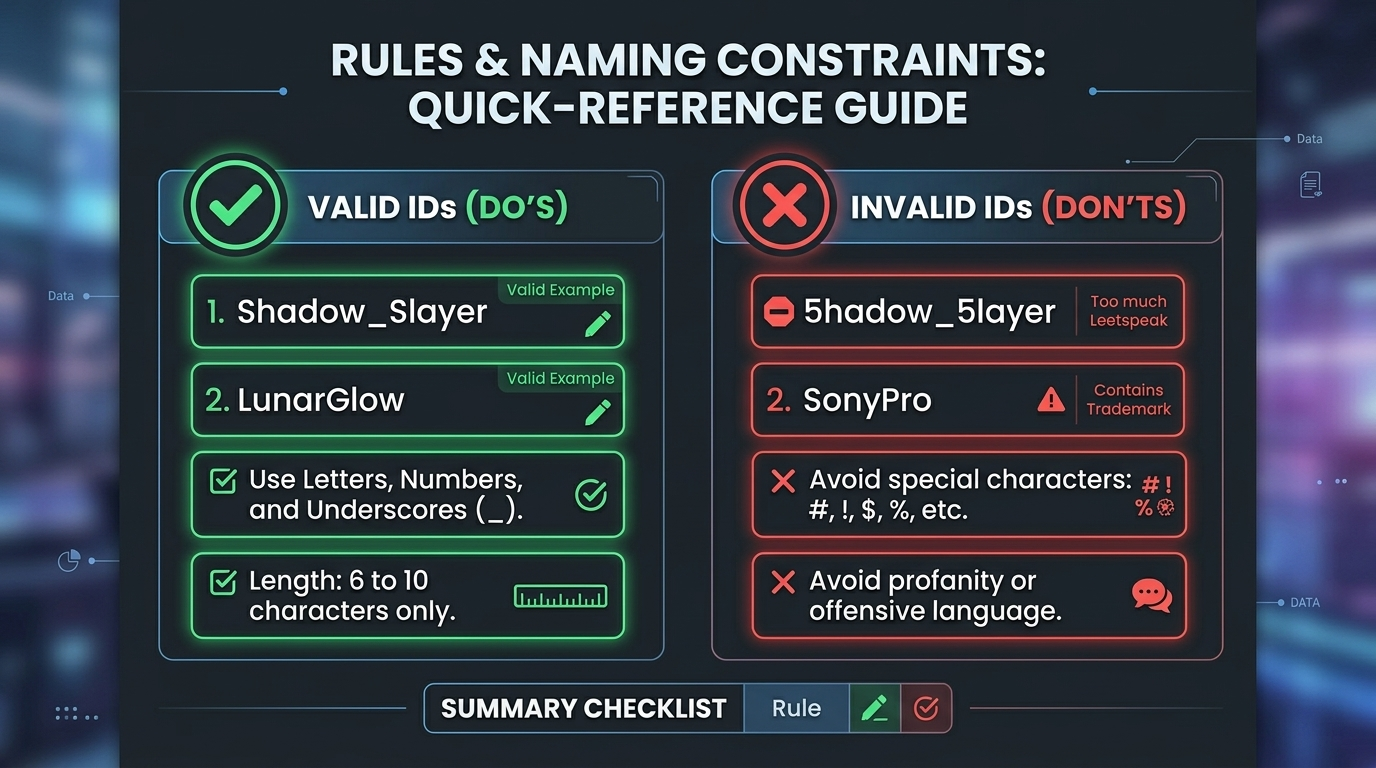
Following the Sony PlayStation Network (PSN) Guidelines is a must if you want to avoid account flags or forced resets. Sony built these rules to keep things civil. Any name with hate speech, slurs, or trademarked brands—think “MarvelHero” or “SonyPro” —will probably get you banned.
Official PlayStation Naming Constraints for 2026
The most basic rule is the 3-16 Character Limit. Your ID has to be at least three characters and no more than sixteen. You can use letters (A-Z), numbers (0-9), underscores (_), and hyphens (-).
Keep in mind that spaces don’t work, and you can’t use symbols like @, $, or !. If you want people to actually be able to read your name in a fast-paced lobby, try to stay between 6 and 10 characters. Avoid heavy “leetspeak” where numbers replace every other letter; ShadowSlayer is much easier on the eyes than 5hadow_5layer.
How to Use AI-Powered Name Generators for the Best Results?
AI-Powered Name Generators have come a long way from just smashing random words together. In 2026, these tools look at gaming trends and linguistic patterns to find something that fits your specific vibe. Instead of staring at a blank screen, you can use AI to check thousands of combinations that match the “clean” look popular in the PS5 Pro era.
As Jax Rivera, a professional esports commentator, puts it: “Your PSN ID is your digital battle cry. It should reflect your playstyle before you even pick up the controller.” Tools like SpinXO or Nickfinder let you plug in keywords—like a favorite animal or a “dark” theme—and give you dozens of options in seconds.
Tryhard vs. Aesthetic: Choosing Your Gaming Persona
When you PSN name generate, you need to pick a “vibe.” Tryhard PSN Names usually look “clean,” like x-Velocity or v_Target. These tell other players you’re here to win. They usually rely on symmetrical symbols and very few numbers.
On the flip side, “Aesthetic” names are more about mood, like LunarGlow or VelvetDash. These are a huge hit with casual players and streamers building a “cozy” brand. Most modern AI generators now have toggles for “Tryhard” or “Funny” to help you skip the stuff you don’t want.

The Art of the Variation: What to Do if Your PSN Name is Taken?
Finding out your dream name is taken is frustrating, but you don’t have to settle for Name12345. You can usually save the original “feel” of the name with a few surgical changes.
The phonetic swap is one of the most reliable tricks. Swapping an ‘S’ for a ‘Z’ or an ‘Ex’ for an ‘X’ (like changing Vortex to VortXx) can often get you through. Using a single underscore in a smart spot (like Soul_Stalker) also keeps the name readable without needing a string of random digits at the end.
Always use a real-time Availability Checker before you head into the PlayStation settings to commit. Tools like CodeItBro let you test ideas instantly. If your choice is gone, try a short suffix like “–XP,” “–Z,” or “–Go” to keep it looking professional.
Trending Styles: Cyberpunk Aesthetics and Competitive Tags
In 2026, Cyberpunk Aesthetics are everywhere on the PlayStation Network. These names use futuristic themes, neon imagery, and “glitch” culture. You’ll see names like NeonVoid, ChromeSamurai, and GlitchStep trending because they match the high-tech look of new PS5 Pro titles.
There’s actually a social perk to picking a trending style. Data from Shhuod shows a 25% increase in friend requests for accounts with cyberpunk-inspired tags. A “cool” name makes it easier for people to engage with you in lobbies. Plus, it just feels right when paired with the sleek PS5 hardware.

Cross-Platform Branding: Beyond the PlayStation Console
If you’re thinking about getting into content creation or pro play, you need a Unified Gaming Identity. Your PSN ID shouldn’t be a one-off; it should be the same name people find on Twitch, TikTok, and Discord.
Consistency makes you easier to find. If someone sees you play a great match in Call of Duty and wants to find your stream, they’re going to search for your PSN name. If your Twitch handle is totally different, you’ve lost a follower.
The Unified Gaming Identity Checklist:
- Use Namechk to see if the social handles are free.
- Make sure the name is easy for teammates or commentators to say out loud.
- Stay away from platform-specific tags like “PS5_Player” so you don’t look out of place if you play on PC later.
Conclusion
Deciding to PSN name generate a new identity is a mix of being creative and following that 3-16 character limit. In 2026, your ID is a major social asset that directly affects your reputation and how many people want to squad up with you.
Your Next Steps:
- Grab an AI generator like SpinXO to get 10 solid ideas.
- Filter for the style you want, like Tryhard PSN Names or Cyberpunk Aesthetics.
- Double-check availability on your PS5 or the PlayStation App before someone else claims your favorite name.
FAQ
What are the official PlayStation Network naming rules for 2026?
Names must be between 3 and 16 characters long and can only include letters, numbers, hyphens, and underscores. Importantly, your ID must adhere to community safety standards; any name found to contain hate speech, harassment, or trademarked terms will be banned by Sony.
How can I check if a generated PSN name is actually available?
The most reliable way is to use the official PlayStation App or the ‘Change Online ID’ menu on your console. While third-party Availability Checkers are excellent for rapid brainstorming, always perform a final check on the PlayStation system to ensure the name hasn’t been recently claimed.
Is it safe to use a third-party PSN code or name generator?
PSN Name Generators are safe tools for inspiration and brainstorming. However, be extremely cautious of “PSN Code Generators” that promise free wallet funds or gift cards. According to BasedLabs, these are often scams. Never provide your PlayStation password to any third-party tool.
How often can I change my PSN Online ID, and what is the cost?
Your very first PSN ID change is completely free. After that, each subsequent change costs $9.99, though PlayStation Plus members receive a discounted rate of $4.99 per change. While there is no limit to how many times you can change your ID, frequent changes can make it difficult for your friends list to keep track of you.
Related Posts

The Ultimate Strong Passphrase Strategy: Why Length Beats Complexity in 2026

500+ Creative Username Ideas for 2026: The Ultimate Guide to Standing Out

Everything About Your Xbox Gamertag: How to Change It, Rules for 2026, and the Asha Sharma Controversy
